

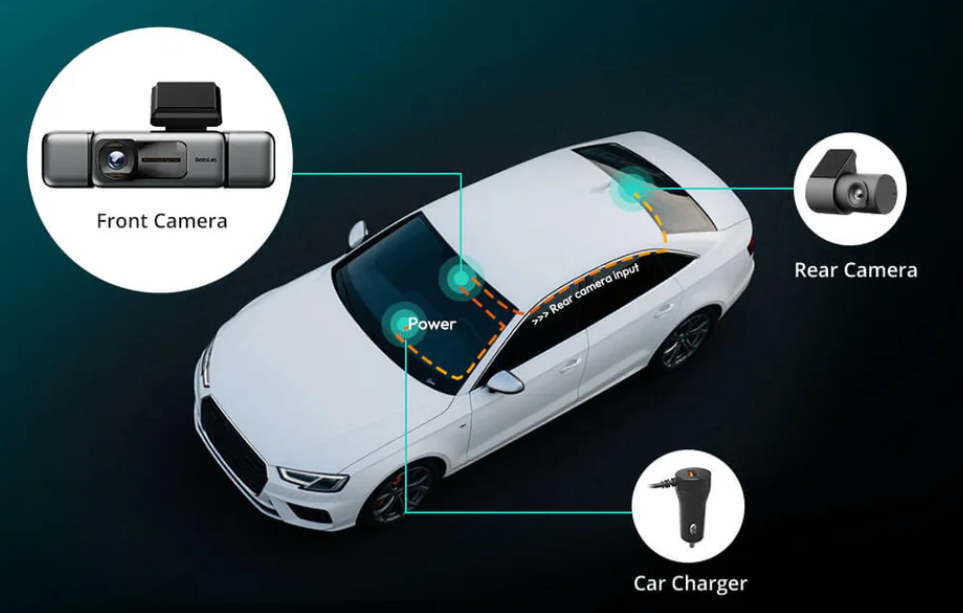
You want to capture every moment on the road without hassle. Botslab Dash Cam makes that simple for you. You get reliable recording every time you drive. Accessing your footage takes only a few taps.
Enjoy peace of mind knowing your dash cam works for you.
Save time and avoid stress with effortless features.
Key Takeaways
Botslab Dash Cam begins recording when you start your car. This makes sure you catch every moment. Loop recording lets the dash cam erase old videos. This way, you always have room for new videos. The 360° 4K coverage shows every detail from all sides. It gives clear proof if you need it. Night vision and GPS tracking make things safer. They also help with insurance claims. The easy-to-use app lets you see your videos fast. You can also share them easily. This makes it simple to handle your recordings.
Capture Every Moment with Effortless Recording

Automatic Start and Loop Recording
You want to capture every moment on the road, and Botslab Dash Cam makes that easy. The dash cam starts recording as soon as you turn on your car. You don’t need to press any buttons or remember to activate it. The camera begins working right away, so you never miss a single moment.
Tip: You can relax knowing your dash cam records every trip automatically.
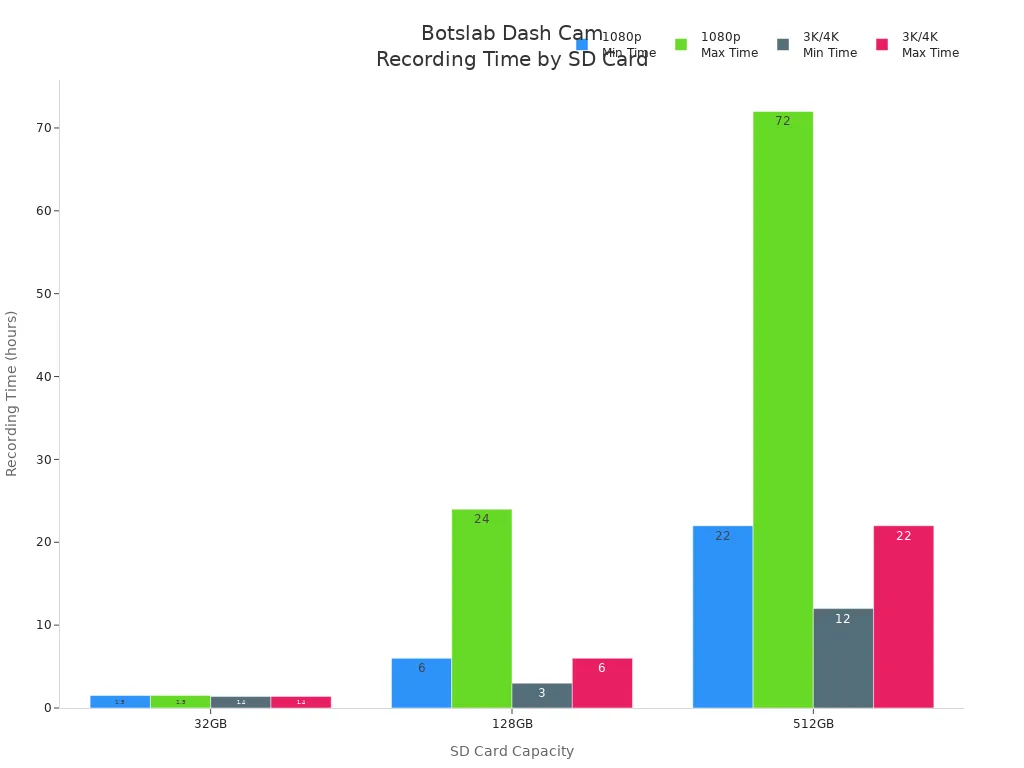
Botslab Dash Cam uses loop recording. This means the camera keeps saving new footage, even when the memory card fills up. It replaces the oldest videos with the newest ones. You don’t have to worry about running out of space or losing important moments. You can choose the SD card size that fits your needs. The dash cam supports cards up to 512GB, giving you plenty of recording time.
Here’s a quick look at how much footage you can store:
SD Card Capacity |
Approximate Recording Time at 1080p |
Approximate Recording Time at 3K/4K |
|---|---|---|
32GB |
Around 1.5 hours |
Around 1.4 hours |
128GB |
Between 6 and 24 hours |
Between 3 and 6 hours |
512GB |
Between 22 and 72 hours |
Between 12 and 22 hours |
You can capture every moment, whether you drive for a few minutes or for hours. The dash cam keeps your memories safe and ready to view.
360° 4K Coverage
Botslab Dash Cam gives you a full view of your surroundings. You can capture every moment from every angle. The camera covers 360 degrees, so nothing escapes its lens. You get clear, sharp footage in 4K resolution. This helps you see details like license plates and road signs, even in tricky situations.
Here’s how Botslab Dash Cam compares to standard dash cams:
Feature |
Botslab G980H Dash Cam |
Standard Dash Cams |
|---|---|---|
Field of View |
360 degrees |
Narrower field |
Resolution |
4K |
Typically 1080p |
You can choose the view you want. The dash cam uses a 3K front camera and several 1080p cameras for full coverage. You get crisp video quality, which is important for capturing every moment on the road. You can spot license plates and road signs with ease. The high resolution makes your footage reliable and useful.
You can capture every moment, day or night.
You can trust your dash cam to record every detail.
You can feel confident knowing you have clear evidence if you need it.
Botslab Dash Cam helps you capture every moment without effort. You get automatic recording, loop storage, and sharp 360° 4K coverage. Your journeys become easy to record and simple to review.
Advanced Features for Every Journey
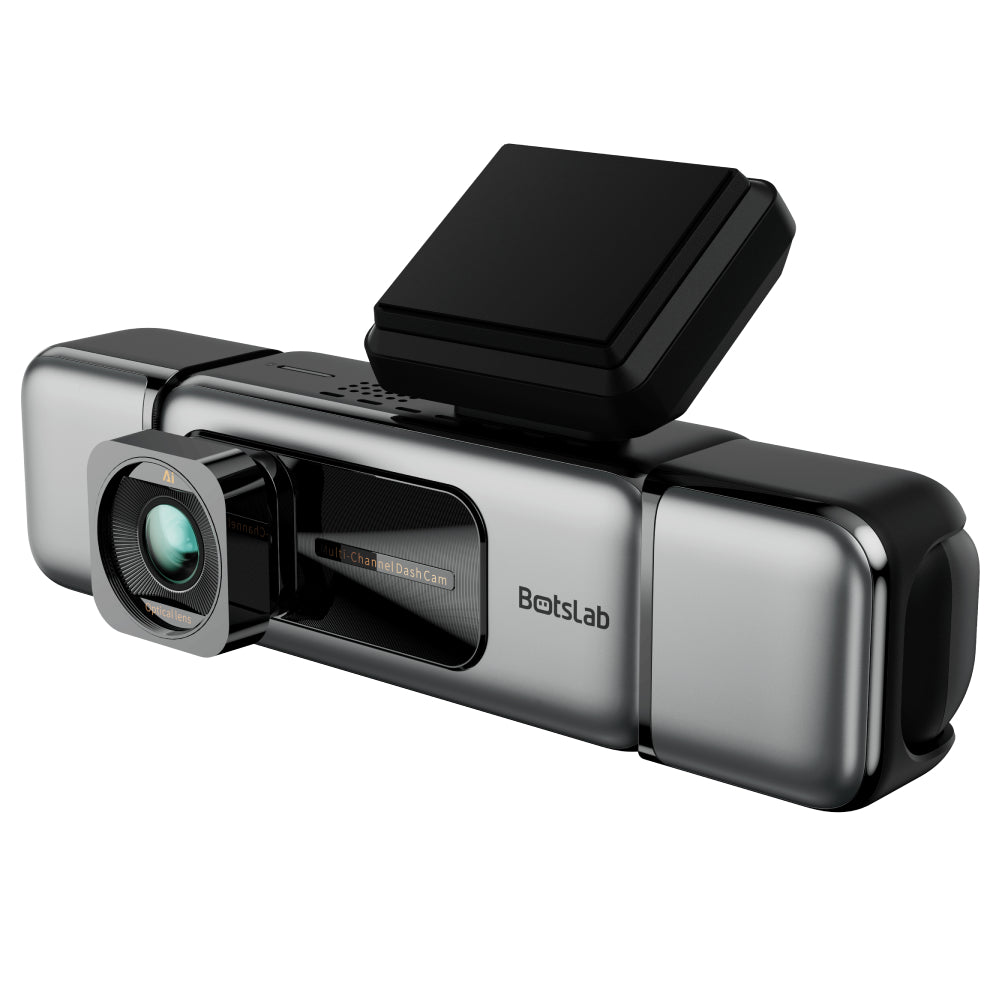
Botslab Dash Cam does more than just record your drive. It packs smart features that help you stay safe and keep every detail clear, no matter the time or place. Let’s look at how these advanced tools work for you.
UHD Night Vision
You don’t have to worry about driving at night or in low light. Botslab Dash Cam uses special night vision modes like Super Night Vision. The camera adjusts its settings based on how much light is around you. It uses advanced noise reduction to cut down on grainy video. The high-quality image sensor, likely from the Sony STARVIS series, grabs more light with its wide f/1.6 aperture. This means you get brighter, clearer videos even when it’s dark.
The dash cam balances brightness and contrast with HDR and WDR technology.
You can see license plates and road signs, even in tough lighting.
The camera works hard to give you sharp images, day or night.
Tip: Nighttime drives feel safer when you know your dash cam captures every detail.
Built-in GPS and Speed Tracking
Botslab Dash Cam tracks your location and speed as you drive. This data shows exactly where you were and how fast you were going if something happens. You can use this information to help with insurance claims or legal questions. The GPS data also works with mapping software, so you can see your travel route on your computer.
GPS proves where an accident happened.
Speed tracking shows how fast you were driving at any moment.
ADAS Alerts and Collision Detection
The dash cam’s ADAS (Advanced Driver Assistance System) gives you real-time warnings. It helps you spot dangers you might miss, like cars stopping suddenly or drifting out of your lane. Collision detection keeps an eye out for sudden impacts and saves important footage right away.
ADAS alerts help prevent accidents by warning you early.
The system boosts your awareness, even if you feel tired or distracted.
You build better driving habits with these smart reminders.
With Botslab Dash Cam, you get more than just video. You get a smart co-pilot that helps you drive safer and keeps every moment clear.
Easy Access and Sharing
App Control at Your Fingertips
You want to check your dash cam footage without digging through menus or plugging in cables. Botslab Dash Cam gives you control right from your phone. The dedicated app connects to your dash cam using fast 5.8GHz Wi-Fi or Bluetooth. You can open the app and see your videos in seconds. The interface feels simple and clear. You tap, swipe, and scroll to find the moment you need.
Tip: You can review your footage while parked or even share a clip before you leave the car.
Botslab Dash Cam stands out because you don’t need to mess with complicated cable setups. Other dash cams often require extra steps or confusing apps. Botslab’s app makes everything easy. You get quick access, smooth playback, and instant downloads. The static sticker mount also keeps your dash cam in place without leaving sticky residue, so setup feels stress-free.
Simple Saving and Sharing Options
Saving and sharing your videos should not feel like a chore. Botslab Dash Cam lets you save clips to your phone with just a tap. You can share your footage with friends, family, or your insurance company right from the app. The process feels fast and straightforward.
Botslab Dash Cam protects your privacy while you share. You can:
Set a strong password for your dash cam’s Wi-Fi or app.
Encrypt your video files to keep them safe.
Control auto-upload features so you decide what gets shared.
Check privacy settings before posting videos online.
You stay in charge of your footage. Botslab Dash Cam makes sharing easy, but you always control who sees your videos.
Note: You can feel confident knowing your dash cam keeps your memories safe and private.
Botslab Dash Cam gives you app control at your fingertips and simple sharing options. You get convenience, security, and a user-friendly experience every time you drive.
You have a dash cam that makes driving easier. Botslab Dash Cam uses smart features to help you record every moment. You do not feel stressed. You get clear videos and wide views. Installation is simple and quick.
Automatic recording
Multi-angle coverage
Built-in GPS
Benefit |
Description |
|---|---|
High Video Quality |
See details in day or night |
Reliable Loop Recording |
Never miss important moments |
Easy Installation |
Start recording right away |
You feel sure each time you drive. Botslab Dash Cam keeps your memories safe. Your trips stay secure.
Want to capture every moment? Make Botslab Dash Cam your trusted road companion.
FAQ
How do I install the Botslab Dash Cam?
You just snap the dash cam onto the magnetic mount and plug it in. The setup takes only a few minutes. You don’t need special tools or skills. The app guides you step by step.
Can I record at night or in low light?
Yes! Botslab Dash Cam uses UHD night vision. You get clear, bright videos even when it’s dark outside. The camera adjusts to low light so you never miss important details.
How much footage can I store on the SD card?
SD Card Size |
1080p Video |
4K Video |
|---|---|---|
32GB |
1.5 hours |
1.4 hours |
128GB |
6–24 hours |
3–6 hours |
512GB |
22–72 hours |
12–22 hours |
You can choose the card size that fits your needs.
Can I control the dash cam from my phone?
Absolutely! You can use the Botslab app to view, save, and share videos right from your phone. The app connects quickly with Wi-Fi or Bluetooth.
Tip: You can check your footage before you even leave your parking spot.








Share:
Eliminate Blind Spots Forever: Why Your Car Needs the Botslab G980H 4-Camera Setup
Botslab W510 2-Camera Kit: The Smarter Way to Protect Your Entire Property Without the Premium Price